

A team event runs on the same pair → post → score rhythm as an individual Swiss (that’s all in Run your event, round by round) — but rosters, board order, and scoring work differently. This guide covers the team-specific parts.
Set up a team section
When you add a section in the build wizard, flip the team toggle and set the board count — how many players score for each team. A team section uses the same pairing methods as any other — USCF Swiss, Double Swiss, Round Robin, Double Round Robin, Quads, or Knockout — the teams just pair against each other instead of individuals. Swiss (teams paired by standings each round) and Round Robin (every team plays every other on a fixed schedule) are the common picks; Double Swiss adds a two-game match against each opponent and supports accelerated pairings if your team field is large. Everything else — pricing, directors, the rest of your sections — works the same as any tournament, and the formats guide covers how each method plays out.
Build the teams from the free-agent pool
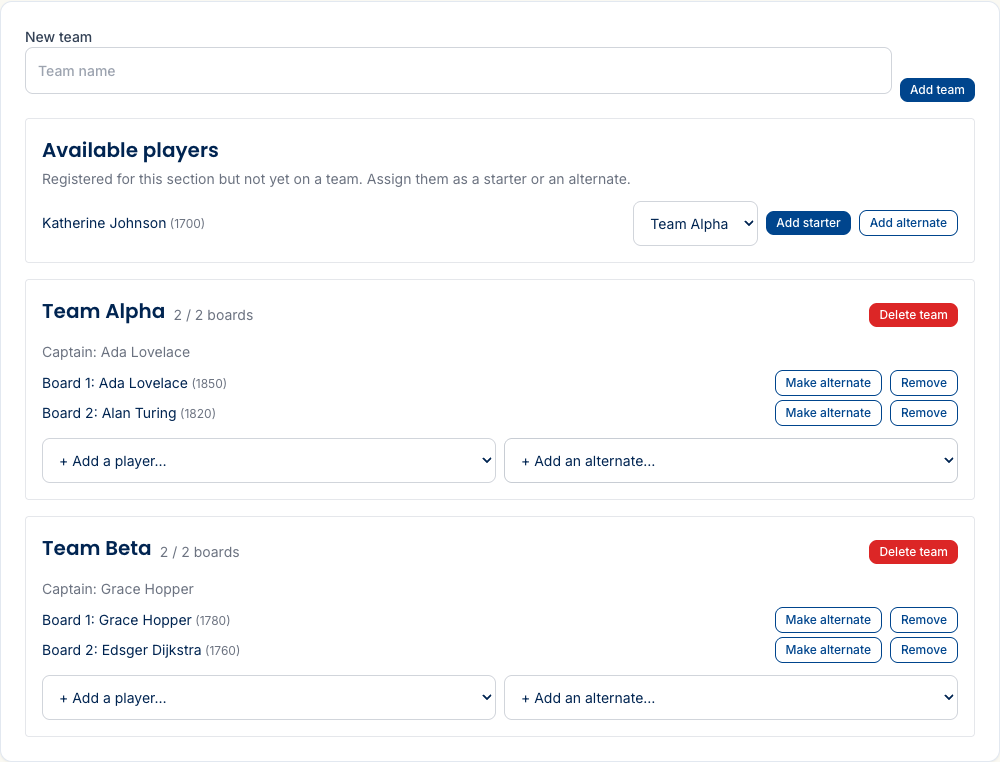
Players who sign up solo for a team section land in the free-agent pool (“Available players”) on the section’s Teams tab — they get there by choosing Join solo when they register, instead of registering a whole team (that’s the player’s side of it). From there you place each one onto a team — either as a starter (fills the next open board) or an alternate (bench).
Get the board order right
USCF team play seats players strongest-first, so board 1 is the highest-rated. Rook Ready watches for boards out of order and flags it; Sort to rating order reseats the team in one click — highest rating to board 1, unrated players to the lowest boards.
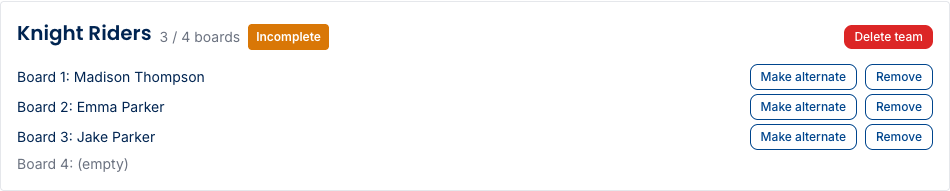
Need to bench or promote someone? An alternate can be promoted to a starter (they take the lowest open board), and a starter can be moved to alternate — the board count and the “Incomplete” flag update as you go.
Incomplete teams, byes, and forfeits
A team short of a full lineup shows an Incomplete badge, and its empty boards become full-point forfeits for the opposing team when it’s paired. With an odd number of teams, one team draws a bye each round — and a bye is credited per filled board (a two-player team on a bye earns 2 points, a full four-board team earns 4).
Pair, publish, and score
Pairing a round, reviewing it, publishing it, and entering board results work just
like an individual event — pair → review → publish → enter results. Publishing a
round is the chief TD’s call; assistant directors can pair rounds and record
results, but not publish.
Team standings
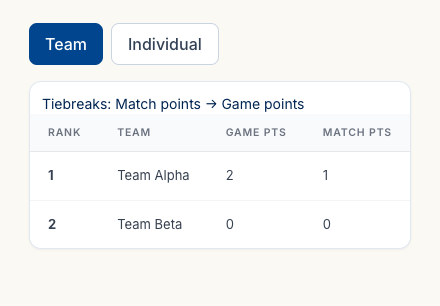
Team standings rank by match points first (win the match, win the point), then by game points (the sum of board results) as the tie-break. Every board result rolls up into its team’s game points automatically as you score.
Place prizes on a team section go to the winning team. The rest of close-out — marking complete and the rating report — is the same as any event; see Close out and submit to the USCF.
What’s next
- Manage your team — share this with your captains; it’s their side of the roster.
- Run your event, round by round — the pairing, scoring, and corrections mechanics in full.
Questions? The FAQ and support@rookready.com are here.
Updated July 13, 2026