

The last round is scored and the trophies are handed out. Three things left: mark the event complete, settle the prizes, and get the results to the ratings agency. Because every result is already in Rook Ready, the rating report builds itself — there’s no crosstable to assemble by hand.
Mark the tournament complete
When the final round of every section is scored, the dashboard prompts you to Mark completed. Doing so locks the results and unlocks the rating report.

Settle the prizes
On the Prizes tab, Rook Ready computes the winners from the final standings. Prizes come in three kinds — Place (1st, 2nd, 3rd…), Class (top player in a rating band), and Special — and the computed winners update straight from the crosstable.
Prizes also have a scope. A prize can belong to a single section (the U1500 class prize, the Open’s 1st place) or run tournament-wide across every section at once — an overall champion, or a “top unrated across the whole event” class prize. Tournament-wide prizes resolve against a merged overall standings page that ranks every entrant from every section together, so a small section’s star still competes for the big prize.
Rating systems are per-section
Before you generate anything, one thing shapes the whole report: each section reports under its own rating system. A section runs as Regular, Quick, Blitz, or Dual — derived automatically from its time control, not something you set by hand — so a G/5 blitz side event submits to the Blitz system while your Regular Open submits to Regular — from the same tournament, in the same close-out. You don’t split them by hand; Rook Ready routes each section to the right system.
Generate the reports — USCF, FIDE, and CFC
Head to the report screen (Back to TD dashboard → the report / export view).
Once the tournament is marked complete, one generate builds both exports at
once: a USCF .txt for the US Chess reporting system and a FIDE TRF16
file for FIDE-rated events. Each pulls your sections, players, ratings, and every
result into the exact format that agency expects. Download whichever you need —
you’re not locked to one.
If you picked CFC as the tournament’s rating system when you created it, the same generate also builds a CFC results export — every player, pairing, and result, labelled and complete. It is not a fixed-column CFC file format; there isn’t a published one to build to, so this is a readable results block you submit to or re-key from for the Chess Federation of Canada office, not a file that claims to parse as an official CFC submission. A player with no CFC rating is still listed, not dropped, so nobody’s opponent goes missing from the file.
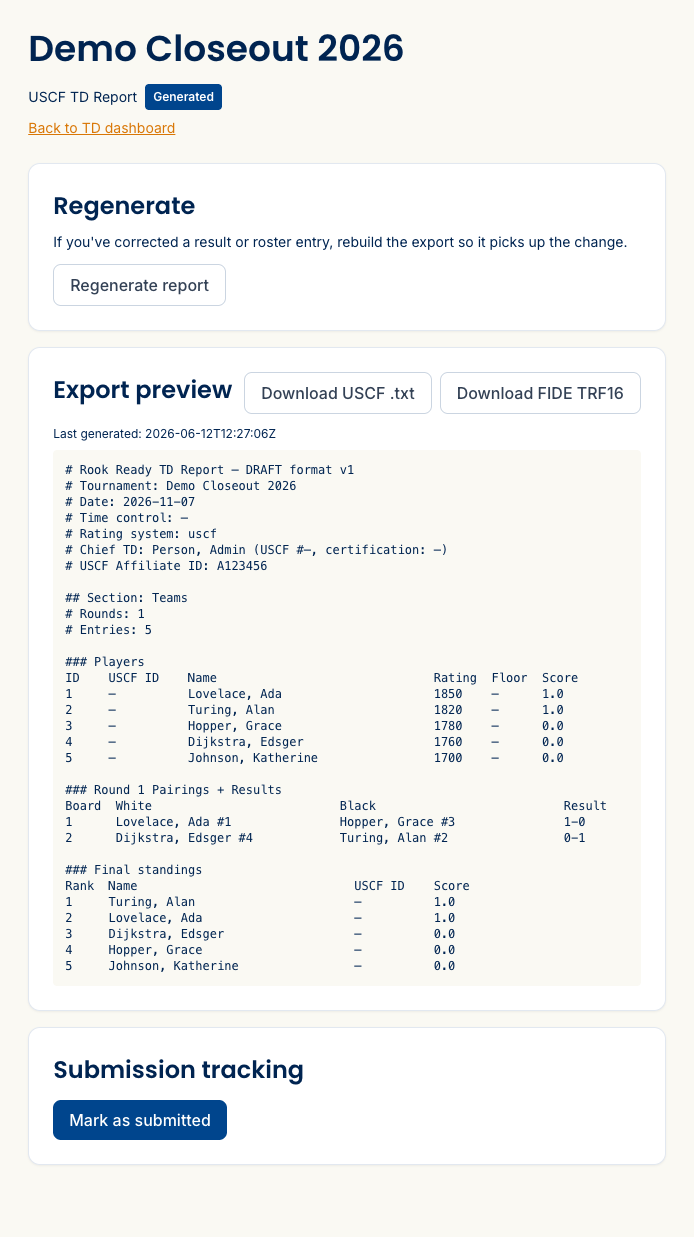
Corrected a result after generating? Hit Regenerate report and the export picks up the change. Any corrections you made during the event travel with the report as a corrections log — one line per override, with who changed what and why. That’s your paper trail if a result is ever questioned.
Submit — and track that you did
The USCF and FIDE files are exactly what each agency’s reporting system expects:
- USCF — submit the
.txtthrough your US Chess affiliate’s reporting process (your affiliate ID is baked into the file). Once US Chess processes it, the event is officially rated. - FIDE — submit the TRF16 file through your national federation / FIDE’s rating submission channel for the FIDE-rated sections.
- CFC — there’s no equivalent automated intake to target, so submit or re-key the results export to the CFC office the way you already do today; Rook Ready’s file just means there’s nothing to hand-assemble first.
After you’ve sent them, use Mark as submitted to record that the event is filed, and keep a copy of each export alongside the event as your record of what went in. Your players’ new ratings reflect the games they played once the agency posts them.
What’s next
- Run your event, round by round — the steps that produce these results.
- Set up your next tournament — start the cycle again.
Questions on the report format or submission? The FAQ and support@rookready.com can help.
Updated September 25, 2026