

Rook Ready bills per club, not per member. You pick a plan that fits where your club is right now — and change it the moment that stops being true. This guide covers picking a plan, trying Rook for free, upgrading, managing your card on file, and canceling.
Before you start
You don’t have to do anything to use Rook Ready. Every new club lands on Pawn, the free tier, and stays there until you change it. Pawn covers what most clubs need to run day-to-day: members, events, attendance, announcements, and up to 5 custom fields. If you never outgrow 30 members, you’ll never see a bill.
Open billing under Settings → Billing (/settings/billing). Admins only — coaches and members don’t see this surface.
Plans at a glance
| Pawn | Rook | |
|---|---|---|
| Members | Up to 30 | Unlimited |
| Custom fields | Up to 5 | Unlimited |
| Events | ||
| Recurring event series | — | |
| In-app announcements | ||
| Attendance tracking | ||
| Email announcements + templates | — | |
| Registration forms | — | |
| Tournaments (sections, pairings, online registration) | — | |
| Club nights (included with Rook tournaments) | — | |
| Reports (the attendance report is on both plans) | — | |
| Priority email support | — | |
| Price | Free forever | $4.99 / mo |
Annual billing knocks a couple of months off — the toggle on /pricing shows the exact monthly equivalent.
Try Rook free for 14 days
The fastest way to know whether Rook fits is to use it. A Pawn club sees a Try Rook free for 14 days button in the Current Plan card until the trial has been used.
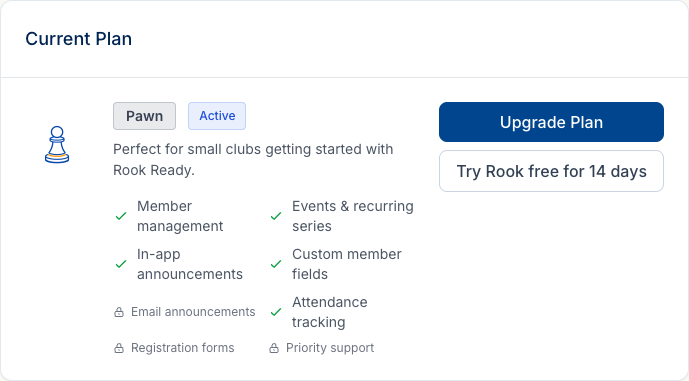
Click it once. Your club immediately switches to Rook tier in trial mode — no card, no Stripe redirect, no confirmation step. The Current Plan card flips to show Trial as the status with the trial end date. Email announcements, registration forms, and unlimited custom fields all unlock right away.
When the trial ends, your club soft-falls back to Pawn unless you check out before then. Nothing breaks; features just lock back to their Pawn states. You get one trial per person, across every club you create — so a second club does not come with a second trial. Once it’s been used, the Try free button doesn’t come back.
Upgrading to a paid plan
When you decide to keep Rook, open Settings → Billing and click Upgrade Plan. A modal previews exactly what Rook unlocks — unlimited members, recurring events, unlimited custom fields, emailed announcements, email templates, and priority email support — alongside the price.
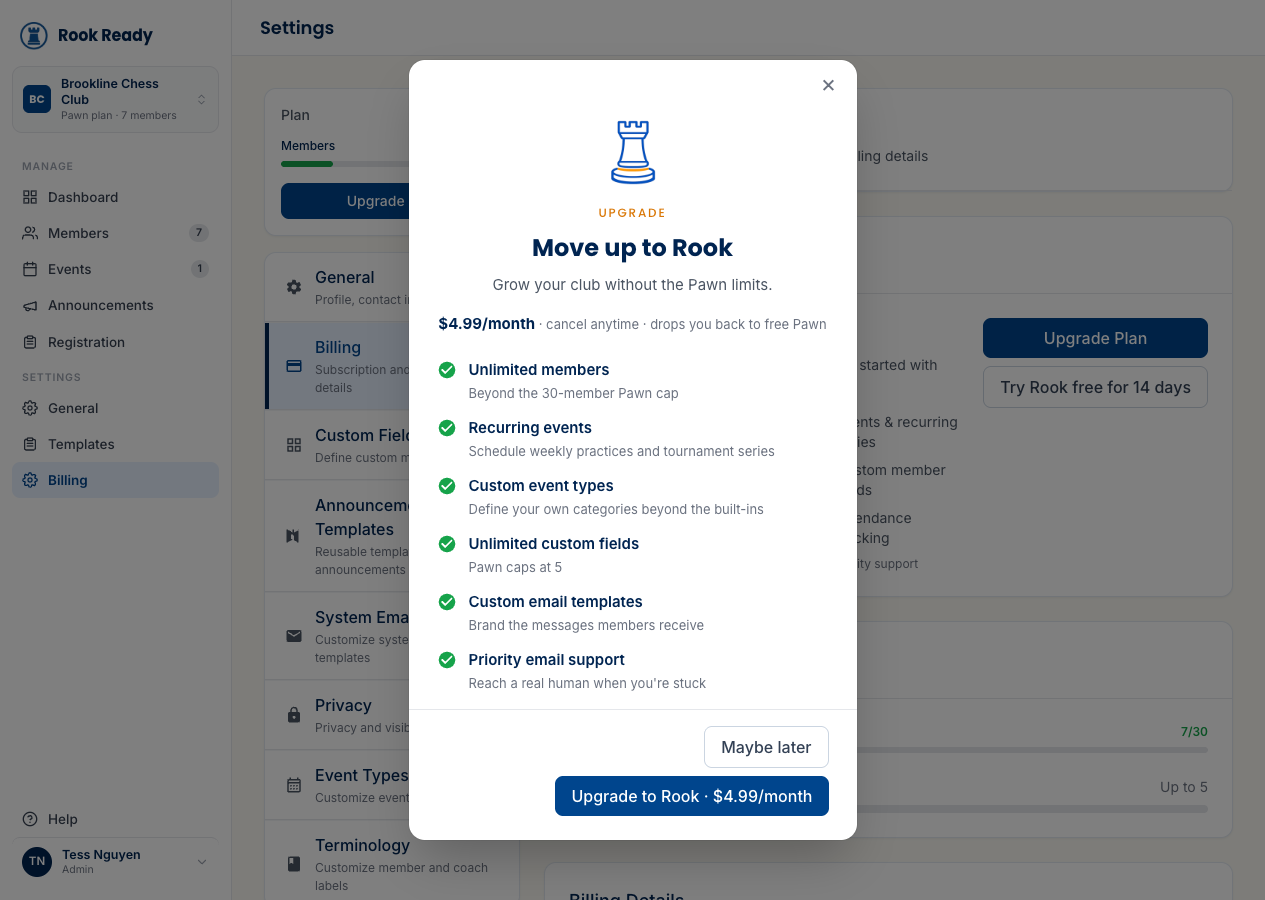
Click Upgrade to Rook. Rook Ready hands you off to Stripe Checkout in a new tab, showing the plan and price you’re buying. Stripe is where you enter the card and complete payment. When you finish, Stripe redirects you back to the Billing page and the Current Plan card flips to Rook with Active status.
Behind the scenes: Stripe is the source of truth for your subscription. Rook Ready stores the tier, status, and limits, but the card and the actual charge live in Stripe. We never see card numbers.
Managing an active subscription
Once you’re on a paid plan the Current Plan card shows your tier as Active, lists every feature you’ve unlocked, and ends with a Cancel Subscription option in the footer.
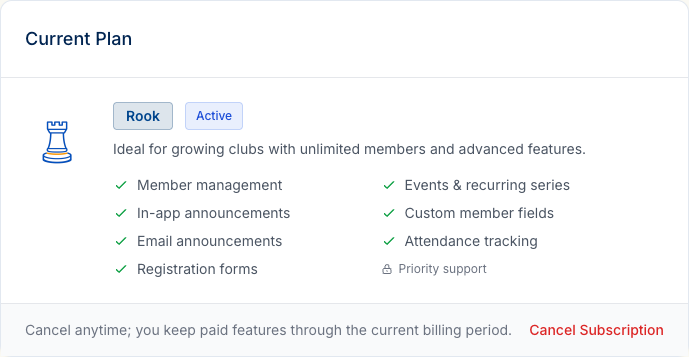
Switching between monthly and annual is right there on the Current Plan card — it tells you how you’re billed now and offers the other cadence next to it. The switch is scheduled rather than immediate: monthly to annual takes effect at your next renewal, and annual to monthly at the end of the term you’ve already paid for. Nothing is pro-rated in either direction, so you’re never charged twice for the same days and never owed a refund for them.
Everything to do with the card and your invoices lives in the Billing Details section below the Current Plan card. The Manage Billing button there opens the Stripe Customer Portal in a new tab:
- Update the card on file — replace the card, change billing address
- View invoices — download PDF receipts for past charges
- Schedule cancellation — at the end of the current period
Changes in the portal sync back to Rook Ready via webhook within seconds. If your tier changes in Stripe, the Current Plan card reflects it on the next page load.
What each subscription status means
The Current Plan card shows a status badge that reflects exactly where you stand:
- Active — paid, current, full feature access. The normal state.
- Trial — Rook features unlocked during the 14-day free trial. Reverts to Pawn if you don’t upgrade before the trial ends.
- Past Due — Stripe failed to charge your card on the latest cycle. Features still work for a grace period; update the card in the portal to clear it.
- Canceled — you canceled, the period has fully ended, and the club has fallen back to Pawn. You can re-upgrade at any time.
- Complimentary — admin-granted access, no Stripe charge. Granted to specific clubs (early users, partner programs) and can be either perpetual or time-bounded.
The badge color matches the status: green for healthy, amber for trial, red for past-due / canceled.
Canceling
You can cancel two ways. The fastest is the Cancel Subscription button in the Current Plan card footer — that schedules cancellation at the end of your current paid period directly from Rook Ready. You can also click Manage Billing, open the Stripe portal, and cancel from there.
Either way, you keep Rook features for the full month you’ve already paid for; then the club soft-falls back to Pawn.
Nothing gets deleted on downgrade. Members above the 30-member limit don’t disappear; you just can’t add new ones until you trim the roster or upgrade back. Custom fields beyond the Pawn-5 limit stay on existing member records but the Add Field button is disabled until you upgrade. Email-only features (templates, email announcements) gate behind an upgrade CTA but the data you’ve created sticks around.
The recurring series, tournaments, club nights and registration forms you built on Rook stay yours to manage on Pawn: you can still rename, reschedule, edit, close or cancel them. What waits for Rook is creating new ones, taking a draft live for the first time, and running a tournament or club night — pairing rounds and entering results.
Discounts for schools and non-profits
We offer pricing breaks for verified school chess programs, scholastic clubs, and registered non-profit organizations. We don’t post the amount publicly because it varies by program size, but we say yes a lot. Email support@rookready.com with your organization’s details and we’ll send a discount code that applies in Stripe Checkout.
What’s next
- Getting Started — if you haven’t created your club yet, start here.
- Adding Members — Pawn’s 30-member limit is the most common reason clubs upgrade; this guide covers the three ways to build your roster.
- Defining Custom Fields — Pawn includes 5 fields, Rook is unlimited. Worth a read before you decide.
- Set up a tournament — one of the big reasons to be on Rook; entry-fee pricing is set per event, separately from your subscription.
Updated September 29, 2026