
Your tournament is built and players are signed up. From here it’s a rhythm: pair a round, post it, record the results, glance at the standings, repeat. Rook Ready runs the pairings for you — to the USCF Swiss rules, or to whatever format each section uses — so you’re reviewing and posting, not hand-calculating colors at 8 a.m.
This guide walks a five-round, two-section weekend Swiss from the first pairing to the final result, including the curveballs every real event throws: a misread scoresheet, a withdrawal, a walk-in at the door. Running a knockout bracket, round-robin, or double Swiss instead? The beat is the same — pair, review, publish, score — with a few differences called out in Running a knockout or round-robin section below.
Before you pair round 1
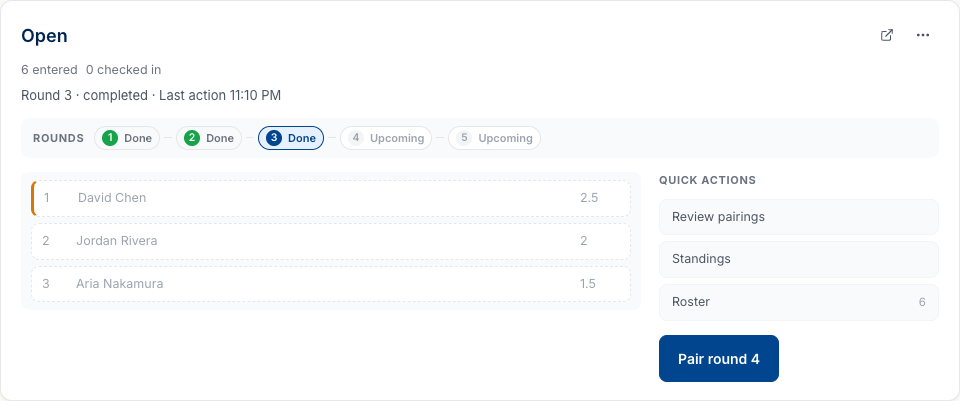
Open the TD workspace. The top of the page gives you each section at a glance — how many players are entered, and whether registration is still open. Three quick things to settle before the first pairing:
- Check the entry list. Everyone who should be playing is entered, in the right section.
- Close registration when you’re ready. One thing to know: pairing round 1 doesn’t close registration on its own. Close it from the workspace for a clean cutoff — or leave it open and players can keep signing up while round 1 is underway. Your call.
- Run the setup checklist. A new tournament keeps a checklist on the dashboard — pricing, registration, pair round 1 — so nothing setup-related slips through.
Pair the first round
Each section has its own card. Click Pair round 1 on the one you’re starting — sections are independent, so pairing the Open section doesn’t touch the U1500.
You land on the pairings review page: every board with its players, ratings, and colors, a Why these pairings? panel you can open for the engine’s reasoning, and Print pairings / Print scoresheets for the wall and the boards.
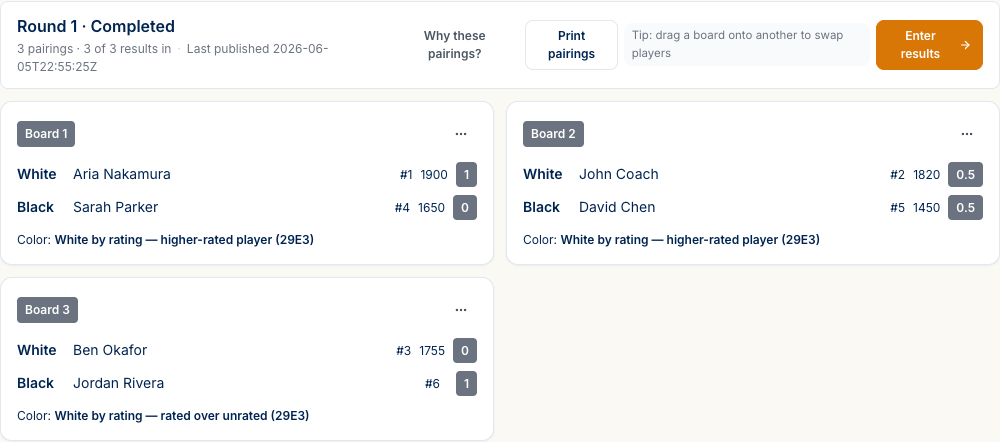
Each board spells out the color call in plain English — “White by rating — higher-rated player,” “Color equalization,” “Color alternation” — with the USCF rule noted in parentheses if you ever need to cite it. A couple of things the page takes off your plate:
- Odd number of players? One player gets a bye, scored automatically. There’s nothing to enter for that board.
- No rematches. The engine won’t pair the same two players twice across the event, so that’s one less thing to keep an eye on.
The review page lays every board out before anything goes live, so a quick scan is all it takes to spot the rare edge case the rules don’t anticipate.
When the boards look right, hit Publish pairings. Publishing is the moment the round goes public: it posts the pairings and notifies your players, parents, and coaches, so everyone knows who they’re playing and on which board. Until you publish, the round is still yours to adjust.
Enter results
As games wrap, open the result grid — the Enter results button on the pairings page, or the inline results view right on the section card. Every board gets three buttons (1-0, ½-½, 0-1), and the grid is built for a fast room:
- Keyboard shortcuts —
123set the result,Enterconfirms,↓moves to the next board,Cclears,Fis focus mode. - Filter chips — All / Pending / Entered / Conflicts. The Pending chip is your “what’s still out” list at a glance.
- Focus mode drops you to one board at a time for blitzing through a stack of scoresheets.
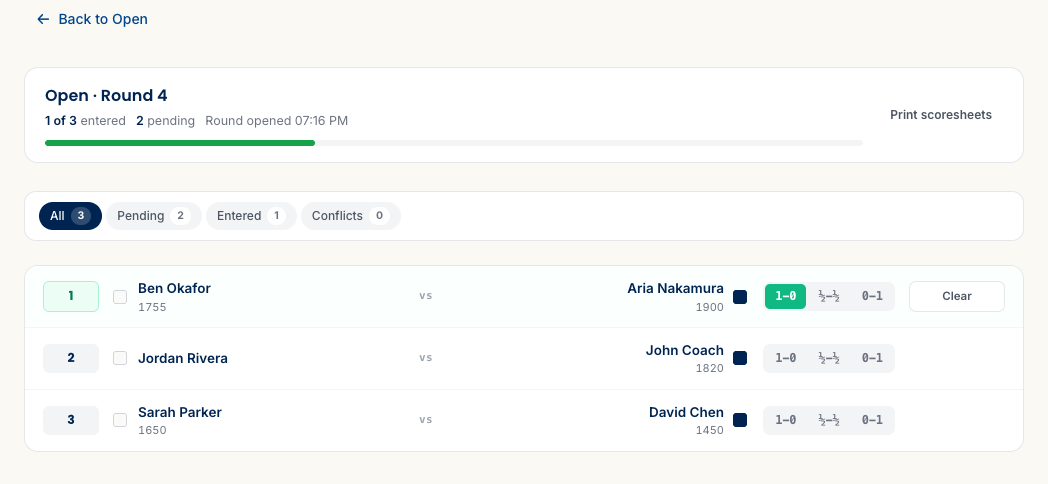
Two people entering results at once? If you’re working the room with an assistant, Rook watches for the same board getting two different results. Those land under the Conflicts chip, tagged with who else entered it — so a double-entry never quietly overwrites the right score. Click the board, see what happened, and set the correct result (jot a reason if you like; it’s saved to the log).
When every board is in, a round-complete banner tells you the round is fully scored.
Read the standings
Standings update with every result. The top three show right on the section card; the full standings page has the complete crosstable and a section selector.
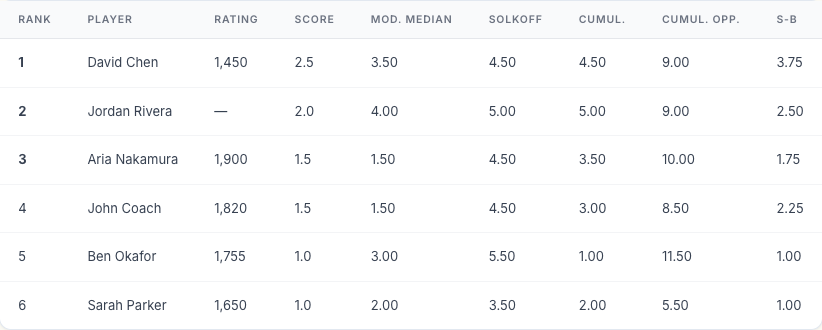
By default, players are ranked by score and then five tie-breaks — Modified Median, Solkoff, Cumulative, Cumulative Opponent, Sonneborn-Berger. That’s the common USCF setup, but it’s yours to change: reorder the tie-breaks or switch any of them off under Settings → General, and any section can keep its own order if it needs one.
Advance through the event
Once round 1 is paired, the dashboard nudges you that the event is under way — Mark in progress. From there, every round is the same beat: pair → review → Publish → enter results → check standings, through round 5.
Running a knockout or round-robin section
A section can run as Swiss, Double Swiss, Round Robin, Double Round Robin, Quads, or Knockout — you chose that at setup. Each keeps the pair → review → publish → score rhythm above; here’s what’s different.
Round-robin and quads pre-build the whole schedule. Every player meets every other (twice, for a double round-robin, with colors reversed the second time), so instead of pairing by standings each round you’re just publishing the next set of boards and scoring them.
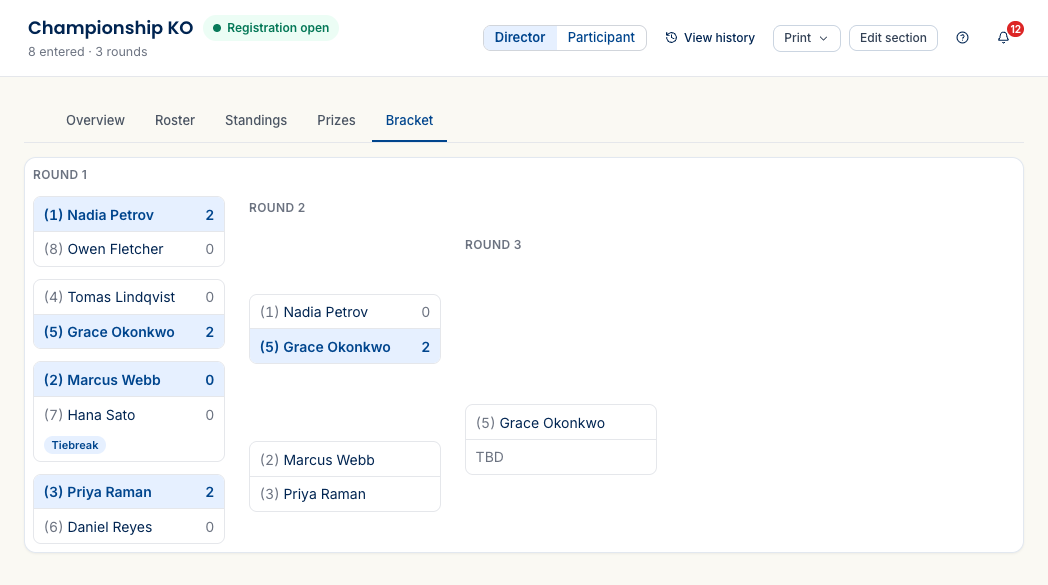
Knockout (single-elimination) replaces the standings table with a bracket. A few things to know as you run one:
- Matches, not single games. Each board is a best-of-N match (best-of-2 by default). Enter each game’s result as usual; the match resolves when someone clinches.
- Level matches settle themselves. If a match ends tied and you left the tiebreak ladder on, Rook automatically adds the next tiebreak stage — rapid, then blitz, then a single Armageddon game (higher seed gets Black with draw-odds) — until someone advances. Prefer to make the call yourself? Turn the ladder off, and a level match shows a Who advances? control so you designate the winner.
- The Bracket tab shows the whole thing at a glance — seeds, who’s advanced, byes, and the champion once the final is in. It’s live for you and for spectators on the public section page.
When a result is wrong
At some point a scoresheet gets misread or a result comes in wrong. This is the part most tools fumble — Rook makes the correction and keeps the trail.
You can’t simply overwrite a result in a round that’s already wrapped; Rook asks you to reopen the round first. That’s deliberate — it’s what keeps every change accountable. Three steps:
1. Reopen the round. On the finished round, click Reopen for corrections. The round goes editable again and the result buttons come back to life.

2. Fix the result. Open the board and override it. You can add a reason — it’s optional, but it’s saved to the audit log and shows up on the rating report’s corrections log later, which is exactly what you want if anyone ever asks. The old result clears; enter the right one.
3. Re-pair the next round if it’s affected. If the player you corrected was
already paired into the next round, a confirmation appears showing precisely whose
scores changed. Type REPAIR to confirm, then choose Keep current pairings or
Re-pair Round N to rebuild that round from the corrected standings.
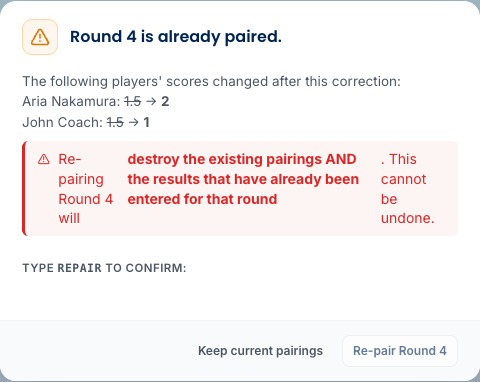
Afterward, the standings tag the affected players with a small amended marker, so it’s clear those scores were corrected rather than originally posted.
Need to change who plays whom rather than a score? Adjust Pairings (on the round’s header) opens a drag editor where you can move players between boards, swap a bye onto a different player, or hand-build a matchup, then review the diff before it goes live. It’s the tool for the rare case the engine’s pairing needs a human override — a no-show you already know about, a family that can’t play each other, a board you’d rather set yourself. The adjusting-pairings guide walks the drag editor and review step in full.
Everything’s on the record
Every one of these moves lands on the tournament’s history timeline — round published, round reopened, a result corrected, a bye reassigned, a player added or withdrawn, even the engine’s own reasoning for an auto-pairing. You can filter the timeline to a single player and follow their entire event, and each entry carries the before-and-after, so “what happened to my kid’s bye request?” has a real answer instead of a shrug. This is the trail that makes corrections safe to make in the first place.
There’s a whole guide on reading that record — what it tracks, how to filter it, and how to expand any change to see the before-and-after: Understanding the Audit Log.
Roster changes during the event
Real events never keep a tidy roster. Three situations:
A player withdraws
On the roster, each player has a Withdraw action. Withdrawing drops them from every future pairing; their completed games stay on the record.
A walk-in shows up after the start
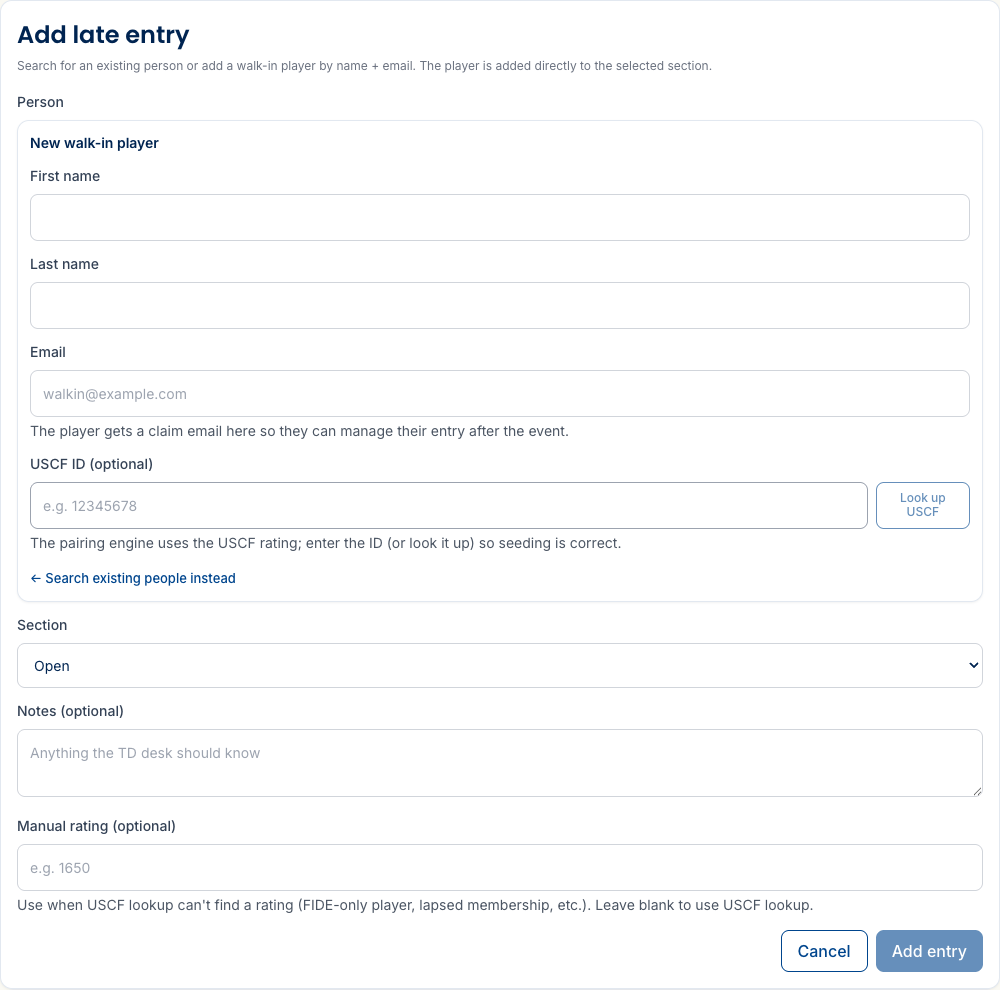
On the roster, click Add late entry. Search for someone already in the system, or add a walk-in by name and email. Pick their section, and either drop in their USCF ID — the pairing engine uses it to seed them correctly, and there’s a Look up USCF button right there — or set a manual rating if they’re unrated or you don’t have the ID handy. The player goes straight into the section. Rounds that already ran score 0 for them — they weren’t here to play them — and if the late entry makes the field an odd number, the next pairing hands someone a bye. If you announced half-point byes for latecomers, reopen the round they missed and assign the bye there; the engine will use what you set.
Someone’s in the wrong section
On the roster, the Transfer section action moves a player to another section. Pick the target section and confirm — their past results stay on the original section’s record.
Half-point byes
If you enabled byes for a section, players can request a half-point bye for a round themselves, from their own entry page, up to the bye deadline. Requests show up when you pair that round, so the bye is already accounted for before colors are assigned — nothing for you to enter by hand.
Accessibility seating, handled for you
Players can flag accessibility needs when they register — a step-free table, a seat near an exit, a quiet corner, a large-print or raised board. Most software stops there and leaves you a note to act on. Rook Ready seats them.
If you named your room’s accessibility tables when you built the section (which facilities each table has), then every time you pair a round, the engine automatically assigns those boards to a table that meets their needs. It matches a board’s combined needs against each table’s facilities, prioritises the hardest cases first, and hands you a list of anything it couldn’t seat so nothing fails silently. The assignment prints right on your pairing sheet.
- Board numbers don’t move. Board number stays the score rank — only the physical table annotation changes, so the pairings themselves are untouched.
- Your call always wins. Assign a table by hand and the engine leaves it alone; it only ever re-does its own automatic assignments.
- It re-runs every round. Nobody has to ask again on Sunday morning.
Finishing the event
When the last round of every section is scored, the section cards switch to an All rounds complete badge and the dashboard prompts you to Mark completed. That locks the results and unlocks both the rating report and prize resolution — prizes computed per section (place and class) and tournament-wide (an overall champion across every section, with a public overall-standings page). The next guide picks up there.
- Close out and submit — mark complete, resolve section and tournament-wide prizes, and generate the USCF and FIDE reports from the results you already entered.
What’s next
- Following the tournament — what players, parents, and spectators see during the event.
- Running a team event — team sections, free agents, and board order work a little differently; that guide covers them.
Stuck on something? The FAQ covers the common questions, and you can always reach us at support@rookready.com.
Updated July 13, 2026